Changelog December 2025: Linear View, Dark Mode & Custom Event Colors
This release focuses on one core idea: Seeing time more clearly over longer horizons. Instead of adding more controls or complexity, we refined how time is displayed, structured, and perceived across the year.
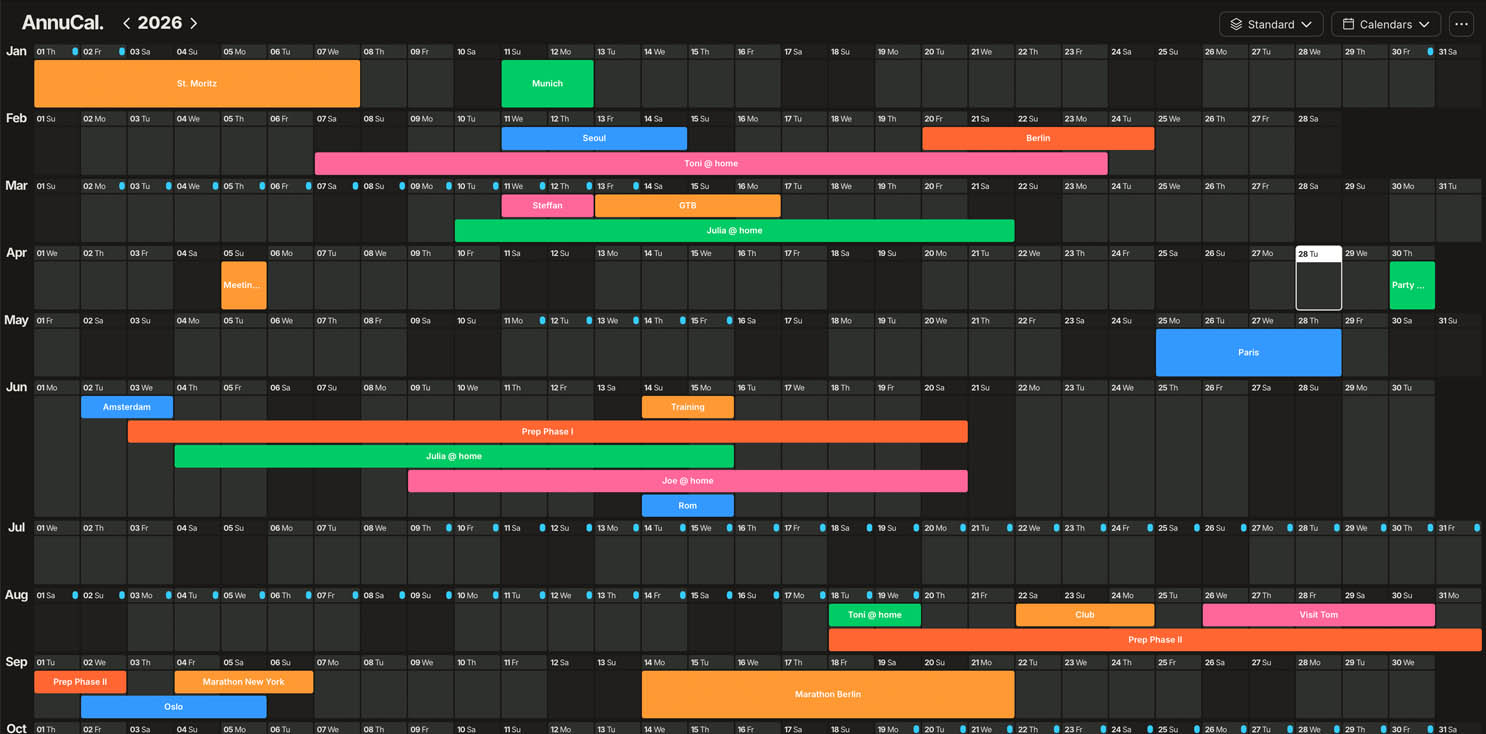
What’s New
This update introduces three improvements designed to support long-term thinking, visual clarity, and sustained planning sessions:
-
Linear 12-month timeline view
-
Full Dark Mode across the app
-
Custom event colors for better visual structure
Linear 12-Month View
Plan your entire year on a single continuous timeline.
-
See all twelve months from left to right, without breaking time into isolated screens
-
Better understand overlaps, gaps, and long-term dependencies
-
Designed for projects, phases, milestones, and extended planning horizons
This view supports planning beyond weeks or months - and makes long-term decisions visible at a glance.
Dark Mode
Plan comfortably at any time of day.
-
Dark Mode is now available across all views
-
Reduced visual strain during longer planning sessions
-
A consistent experience, regardless of when or how long you plan
Dark Mode is not just visual preference - it supports sustained focus when working with time over longer periods.
Custom Event Colors
Bring clarity to complex timelines.
-
Assign individual colors to events
-
Create your own visual system (work, personal, projects, family)
-
Improve readability when multiple timelines overlap
Colors help distinguish meaning - not just entries - across the year.
Coming Next
We’re already working on the next major improvements:
-
Google Sign-In
-
Fully functional mobile access
👉 Try it now: www.annucal.com